Cloud technology has transformed the way businesses manage their operations, making it easier to work efficiently from anywhere. Sage Cloud Services is a reliable cloud platform designed to help businesses improve productivity, secure important data, and simplify financial management. Whether you’re a startup, small business, or large enterprise, Sage Cloud Services offers flexible solutions that support growth while reducing IT complexity.
What Are Sage Cloud Services?
Sage Cloud Services provide businesses with secure, cloud-based access to accounting, financial management, payroll, and business applications. Instead of relying on traditional on-premises servers, organizations can store and manage their data in the cloud, allowing employees to access critical information anytime and from virtually any internet-connected device.
This cloud-first approach helps businesses improve collaboration, automate routine tasks, and maintain business continuity without investing heavily in physical infrastructure.
Key Features of Sage Cloud Services
1. Access Your Business Anywhere
One of the biggest advantages of Sage Cloud Services is remote accessibility. Employees, accountants, and business owners can securely log in from laptops, tablets, or smartphones to manage financial data and business operations regardless of location.
2. Scalable for Growing Businesses
As your business expands, your software should grow with you. Sage Cloud Services make it easy to increase storage, add users, and enable additional features without purchasing new hardware or reinstalling software.
3. Advanced Security
Business data is one of an organization’s most valuable assets. Sage Cloud Services include multiple security layers such as:
- Data encryption
- Secure user authentication
- Regular security updates
- Continuous monitoring
- Automated backups
These features help protect sensitive information against cyber threats while supporting regulatory compliance.
4. Reliable Performance
Cloud reliability is essential for business operations. Sage Cloud Services are built with high-availability infrastructure that minimizes downtime through redundant systems, backup environments, and disaster recovery capabilities.
5. Better Team Collaboration
Employees can collaborate more effectively by sharing documents, accessing real-time financial information, and communicating across departments without being limited by office locations.
Benefits of Using Sage Cloud Services
Improved Flexibility
Business owners and finance teams can monitor operations from virtually anywhere. This flexibility supports remote work, faster decision-making, and improved customer service.
Real-Time Financial Visibility
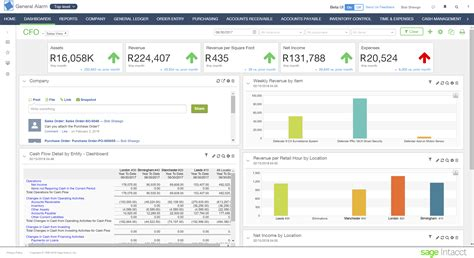
Cloud accounting provides immediate access to current financial information, allowing businesses to generate reports, monitor cash flow, and make informed decisions without waiting for manual updates.
Lower IT Costs
Traditional software often requires expensive servers, maintenance, upgrades, and dedicated IT staff. Sage Cloud Services replace much of this infrastructure with affordable subscription-based pricing, helping businesses better manage operational costs.
Automatic Updates
Software updates and security improvements are delivered automatically, ensuring businesses always have access to the latest features without manual installations.
Enhanced Data Protection
Regular cloud backups significantly reduce the risk of data loss caused by hardware failures, accidental deletion, or natural disasters.
How to Migrate to Sage Cloud Services
Moving to the cloud requires proper planning. Following a structured migration process helps minimize disruptions.
Step 1: Assess Your Existing Systems
Review your current software, databases, files, and workflows. Identify what information needs to be transferred and determine any compatibility requirements.
Step 2: Select the Appropriate Plan
Choose a Sage Cloud Services plan based on your company’s size, number of users, storage requirements, and business objectives.
Step 3: Develop a Migration Plan
Create a timeline, assign responsibilities, and communicate the migration schedule with employees to ensure a smooth transition.
Step 4: Prepare Your Data
Before migration:
- Remove duplicate records
- Archive outdated information
- Organize business files
- Verify data accuracy
- Create complete backups
Step 5: Perform the Migration
Transfer applications, customer records, financial data, and other essential business information to the Sage Cloud environment while monitoring progress throughout the process.
Step 6: Test the New Environment
After migration, verify that:
- Applications function correctly
- Reports generate accurately
- User permissions work properly
- Integrations remain operational
Testing helps identify issues before full deployment.
Step 7: Train Your Team
Provide employees with guidance, documentation, and training sessions to ensure they can confidently use the new cloud platform and maximize its features.
Integrating Sage Cloud Services with Other Business Applications
One of Sage Cloud Services’ strengths is its ability to connect with other business software. Integration reduces manual work and creates a more connected business environment.
Common integrations include:
- Customer Relationship Management (CRM) systems
- Payroll software
- Inventory management platforms
- Project management tools
- E-commerce platforms
- Business intelligence and reporting software
These integrations allow information to flow automatically between systems, improving accuracy and operational efficiency.
Why Integration Matters
Centralized Information
All departments work from the same data source, reducing inconsistencies and duplicate records.
Improved Productivity
Automating repetitive tasks saves time and allows employees to focus on higher-value activities.
Better Reporting
Integrated systems combine financial, operational, and customer data into comprehensive reports that support better decision-making.
Enhanced Customer Experience
Businesses can process orders faster, monitor inventory more accurately, and deliver improved customer service through connected systems.
Choosing the Right Sage Cloud Services Plan
Selecting the right plan depends on your business requirements.
Business Size
Smaller businesses may only require essential accounting features, while larger organizations often need advanced financial management, reporting, and multi-user capabilities.
Budget
Evaluate subscription costs alongside expected business benefits. Cloud solutions often eliminate large upfront investments in hardware and maintenance.
Business Requirements
Identify the tools your organization relies on, such as payroll, invoicing, inventory management, or financial reporting, and choose a plan that includes those capabilities.
Future Growth
Select a plan that can scale as your business expands, making it easy to add users, storage, and advanced functionality without major system changes.
Support and Training
Reliable technical support and educational resources are valuable when implementing new software. Choose a plan that offers responsive customer assistance, documentation, and training materials.
Conclusion
Sage Cloud Services provide businesses with a secure, scalable, and efficient way to manage accounting, financial operations, and business data in the cloud. By offering remote access, strong security, seamless integrations, automatic updates, and flexible subscription options, the platform enables organizations to improve productivity while reducing IT costs.
Whether you’re modernizing existing systems or launching a growing business, Sage Cloud Services can help streamline operations, improve collaboration, and support long-term business success.